For this assignment, you will create a Word document that is mail merged with an Excel customer contact table. Mail Merge can be used to create bulk labels, letters, envelopes, and emails. You will be creating letters to send with the . Follow the directions below, then submit your assignment. If you get stuck on a step, review this module and ask your classmates for help in the discussion forum.
You have been tasked with mailing the newsletter you previously created to customers of Rowan Retail. In order to accomplish this task, you need to merge the customer contact information in the Excel file with a Word document in order to make mailing labels. Follow these steps to accomplish the task.
- The first step is to download the and save it to the Rowan folder on your desktop.
- Open Word and create a new document by clicking on the Blank document option in the window.
- Save the document by using Save As and rename the document to BA132_LastName_MailMerge.docx, replacing LastName with your own last name. (Example: BA132_Hywater_MailMerge)
- Select the Mailings tab then the Start Mail Merge button and select Step-by-Step Mail Merge Wizard.
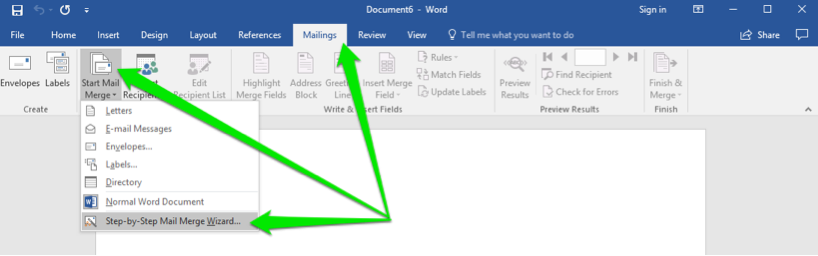
- In the Mail Merge menu, click the Next: Starting document link.

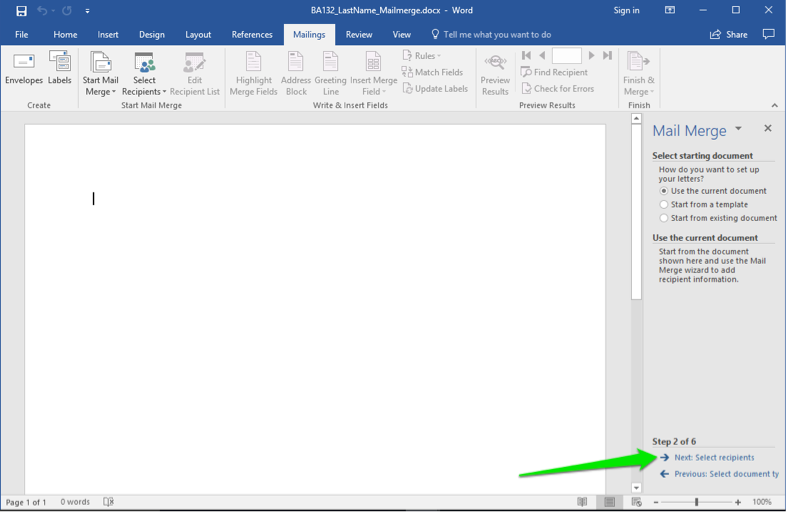
- You will be creating letters for the contacts who will receive the newsletter, so leave the document type in Letters and click the Next: Select recipients link.
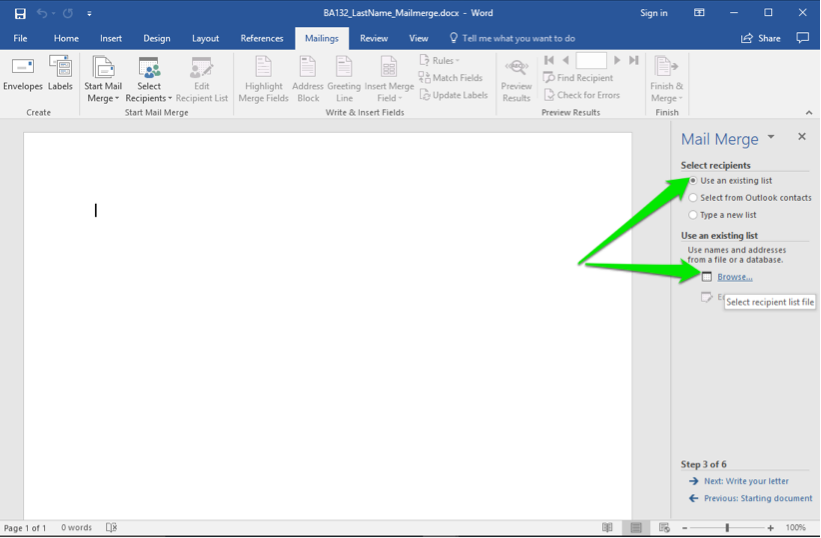
- You already have a file with a contact list. Leave the selection Use an existing list selected and click on the Browse link. This will open up a dialog box for your computer.
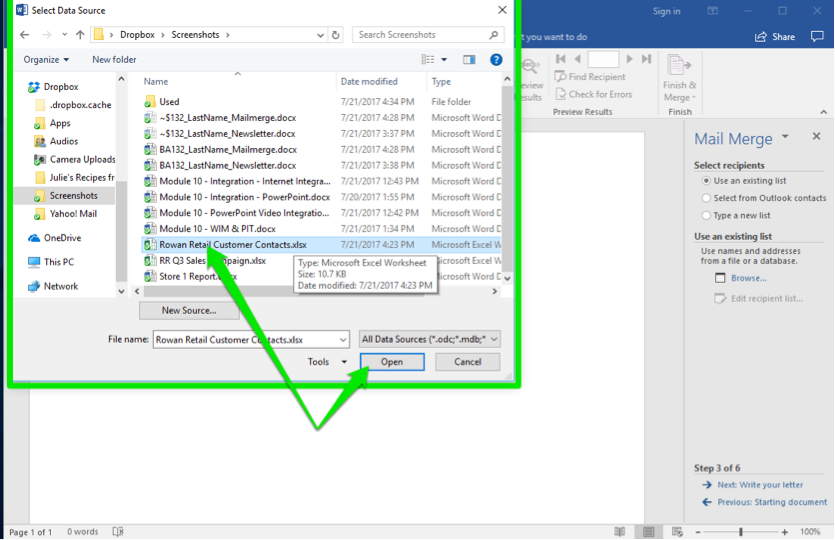
- Select the correct folder and scroll through the files until you find the Rowan Retail Customer Contacts.xlsx file. Either double-click on the file or select it and click the Open button.
- A different dialog window will open that allows you to choose the different tabs in the Excel file. The Customer Contact Data$ is the one you want. Either double-click on the file or select it and click the Open button. Note: Leave the box checked since your data files first row is a header row.
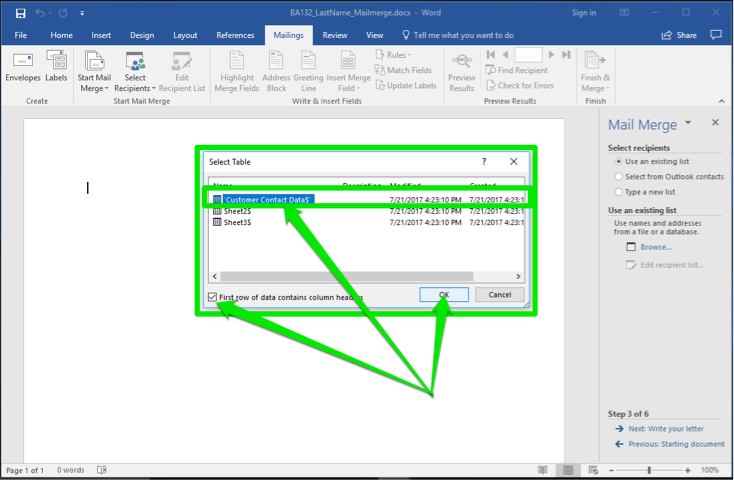
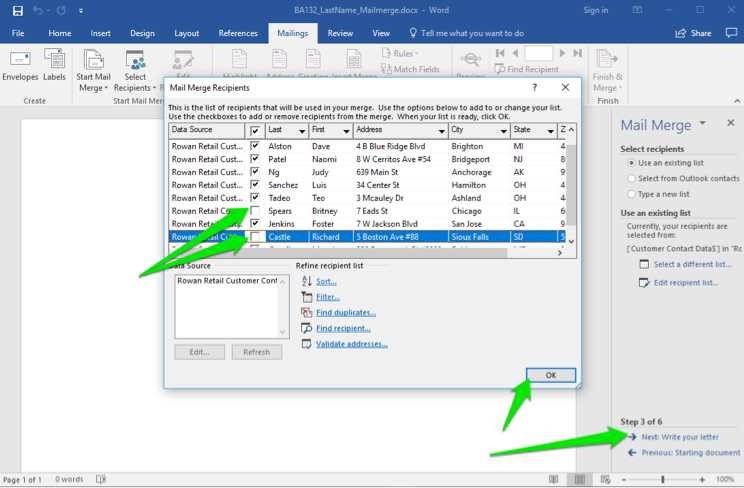
- After you have clicked the OK button, a final dialog box appears. It shows all of the contacts in the file. Find Richard Castle and Britney Spears and uncheck their boxes. They do not need a newsletter. Now click the OK button and then the Next: Write your letter link.
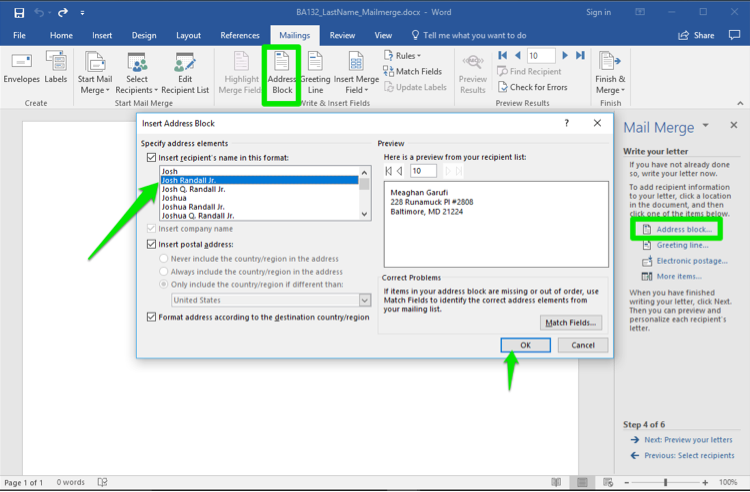
- Now begin to compose the letter by first placing your cursor in the document page where you want the address. Click the Address Block option from the wizard or the ribbon button, select the naming style, then click OK.
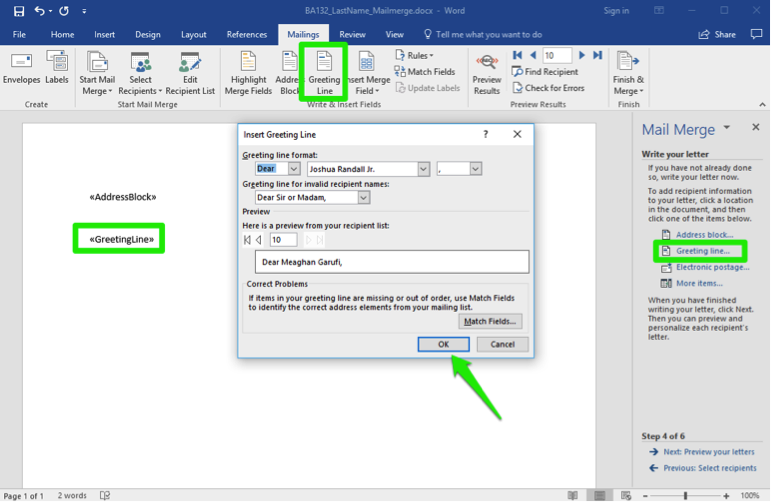
- Next, place the cursor where you would like the greeting to be in the letter. Select the Greeting line from the wizard or the ribbon button, decide the style of greeting, and click the OK button.
- Paste the following text to serve as the body of your letter.
Enclosed is the quarterly newsletter for Rowan Retail. Please enjoy the information therein and pay special attention to the dates for the special sales this summer. If you have any questions or concerns, please contact us as soon as possible.
- Close the letter with Sincerely and then your name. Save your work, then click Next: Preview your letters.
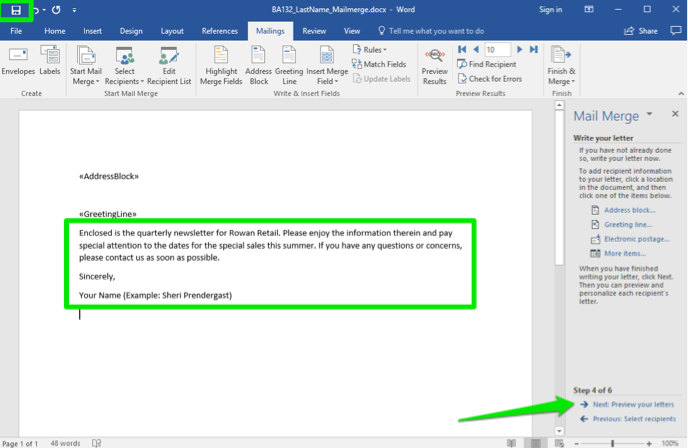
- Scroll through the letters by clicking on the arrows. You should be missing Britney Spears and Richard Castle in the recipients. Now click on Next: Complete the merge.
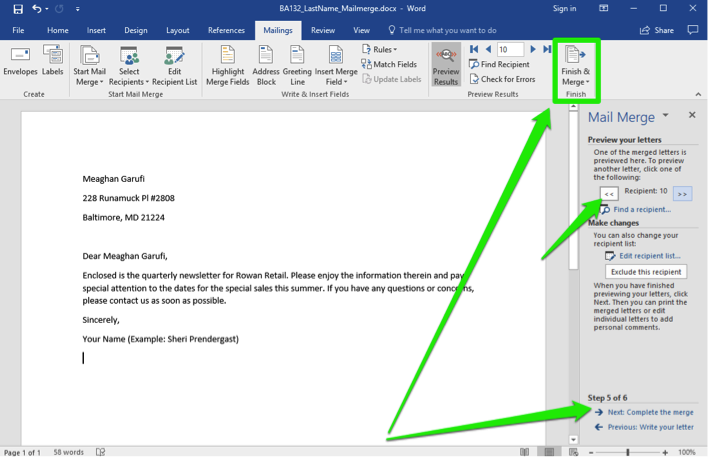
- Your merge mail file is now complete! Save your file once more, this time as a PDF (use the .pdf file extension), and submit the PDF to Canvas.
Get Your Paper Before the Deadline. Our Services are 100% private and Confidential
Useful Links That Will Help You Around
Link to new order https://studentsolutionsusa.com/orders/stud/new
link to login page https://studentsolutionsusa.com/orders/login
New user registration link https://studentsolutionsusa.com/orders/register
Forgot Password https://studentsolutionsusa.com/orders/forgot/password
FREQUENTLY ASKED QUESTIONS
Question: How does this work?
Answer: Good Question. We are a group of a freelance board of students and professional essay writers. At our website, you may get help with any type of academic assignments: essay, coursework, term paper, business plan, case study, article review, research paper, presentation, and speech. Top writers can help with complex assignments such as dissertations, thesis papers, etc. All of them are professionals possessing excellent knowledge in their field of expertise, perfect writing skills, quality, and speed. When you place an order on our website, we assign it to the best writer. Once the writer finishes the work, the paper is submitted to our quality assurance desk who go through it and ensure it is unique and plagiarism free and that the instructions were followed to the detail. After this step we upload the paper in your account, we also send a copy to the email that you used to register the account with. we can guarantee you that the paper will be 100% plagiarism free. Besides, our services are 100% private and confidential
Question: How do I place an Order after getting to the order page
Answer: There are three major steps in the ordering process
Step 1 ....................................................paper details In this step, you will fill in the instructions of your paper; you can upload any materials that you feel will make your assignment a success. Besides, you can also email us at [email protected] Remember to specify the correct academic level. Please note that sources mean the number of references.
Step 2...................................................... Price calculation Kindly specify the number of pages, type of spacing and the correct deadline. This step will give you the estimated cost minus discount -- you may add the extra features if you wish.
Step 3 ....................................................discount and payment Use the discount code HAPPY2018 to enjoy up to 30% discount of your total cost After this step, proceed to safe payment; you can checkout using your card or PayPal Please note we will send the complete paper to the email you will provide while registering. A copy will also be uploaded to your account
Question: How will I know when my paper is complete? or How will I get the complete Paper?
Answer: Once we are done with the paper, we will be uploaded to your account. A copy will also be sent to the email you registered with. We can guarantee you the following:- 1. Our service is private and confidential; we don't spam or share your contacts with anyone 2. The final paper will be plagiarism free. We will send a Turnitin Report to the email you registered with 3. At our company, willing to do free unlimited revisions until you are satisfied with your paper
Question:- Am a new client, How can I get the guarantee that the paper will be completed and sent to me before my deadline?
Answer: Thank you for expressing your concerns. We would love to have you as our loyal customer. We are certain if we do good work, you will come back for me. Besides, you will give us referrals to your friends and family. For that reason, we can’t fail to deliver your paper within your specified time frame. We will ensure we submit the paper on time so that you can have enough time to go through it, if you have problems with the paper delivered, you can request a free revision. You are entitled to as many revisions as you would wish until you get a paper that satisfies you
Useful Links That Will Help You Around
Link to new order https://studentsolutionsusa.com/orders/stud/new
link to login page https://studentsolutionsusa.com/orders/login
New user registration link https://studentsolutionsusa.com/orders/register
Forgot Password https://studentsolutionsusa.com/orders/forgot/password
